Taming Mixed Lighting in Event Photography with AI
By Imagick Editorial Team · Published
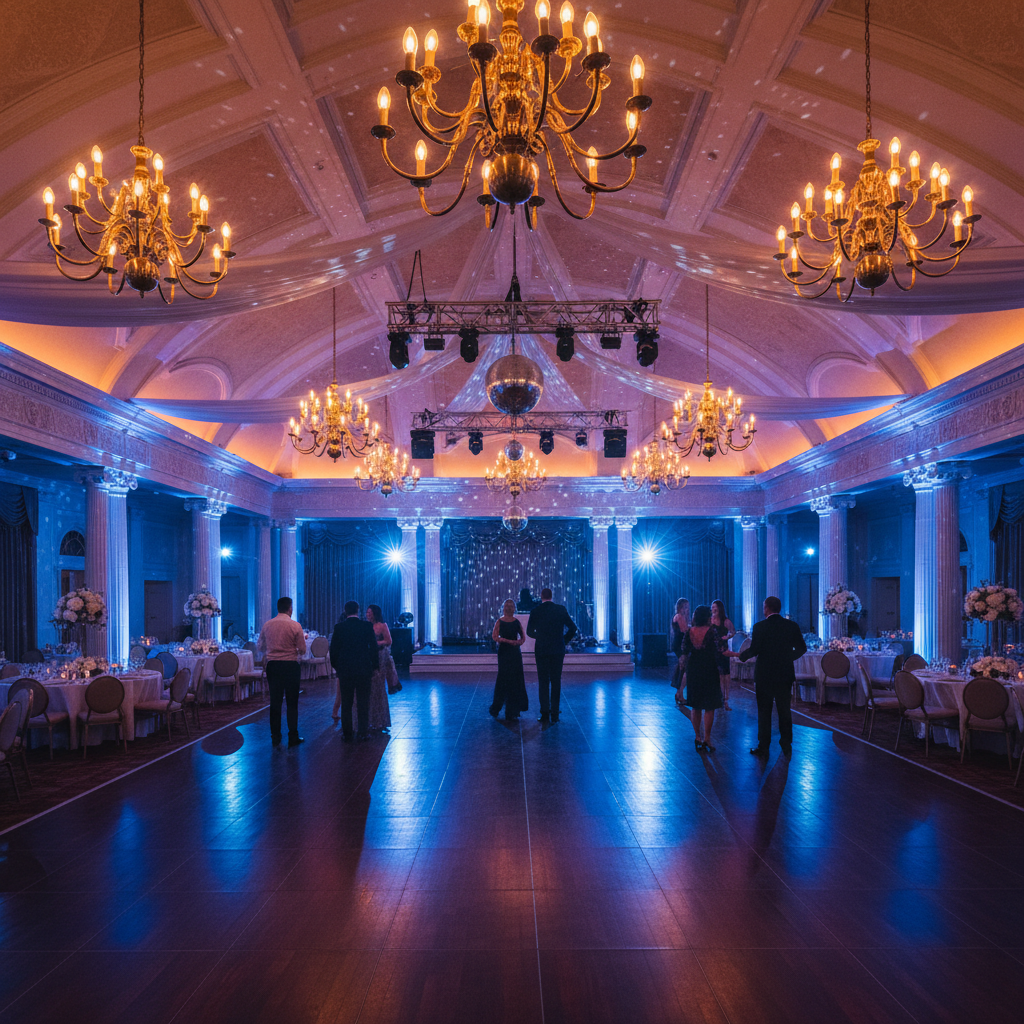
Understanding Mixed Lighting Challenges in Event Photography
Event photography frequently presents complex lighting scenarios, often referred to as mixed lighting. This occurs when multiple light sources, each with a distinct color temperature and intensity, illuminate a single scene or subject. Common culprits include the warm glow of tungsten bulbs, the cool cast of fluorescent fixtures, the varied hues of LED uplights, natural daylight streaming through windows, and the photographer's own flash.
These disparate light sources create a range of issues for photographers. Skin tones can appear inconsistent, shifting from natural to overly warm, cool, or even magenta/green. White balance becomes difficult to set globally, as correcting for one light source often compromises another. Shadows and highlights may exhibit different color casts, complicating exposure and color grading. The cumulative effect is a gallery of images lacking visual cohesion, demanding extensive post-processing to achieve a professional and consistent look. This challenge is particularly pronounced in dynamic event environments where lighting conditions change rapidly and unpredictably.
Traditional Approaches to Mixed Lighting Correction
Historically, photographers have relied on a combination of in-camera techniques and meticulous post-processing to address mixed lighting. In-camera strategies include using custom white balance settings, employing gels on flashes to match ambient light, or strategically positioning subjects to minimize conflicting light sources. However, the fast-paced nature of events often limits the feasibility of these proactive measures.
Post-processing has traditionally involved a multi-step workflow:
1. Global White Balance: An initial adjustment to establish a baseline, often a compromise that doesn't perfectly suit all areas of the image.
2. Localized Adjustments: Extensive use of brushes, gradient filters, and radial filters within software like Adobe Lightroom or Photoshop. These tools allow photographers to isolate specific areas (e.g., a subject's face, a background element) and apply targeted color temperature, tint, and saturation corrections.
3. Color Grading: Further refinement to ensure color harmony and consistency across the entire image and, ideally, the entire event gallery.
While effective, this manual approach is exceptionally time-consuming, especially for the high volume of images typical of weddings, corporate events, or concerts. The repetitive nature of localized color correction can lead to fatigue and potential inconsistencies across a large set of photographs, impacting overall gallery quality and delivery times.
Integrating AI into the Mixed Lighting Workflow
Artificial intelligence (AI) tools are emerging as a significant aid in managing the complexities of mixed lighting. These platforms leverage machine learning algorithms to analyze image data, identify various light sources, and intelligently correct color casts and white balance across different regions of a photograph. The goal is to provide a more neutral and consistent starting point for further refinement.
An AI photo editing workflow can significantly reduce the manual effort involved in initial color correction. Platforms like Imagick.ai are designed to process large batches of images, applying sophisticated algorithms to detect and mitigate the effects of mixed lighting. This often involves analyzing skin tones, identifying common color casts (e.g., green from fluorescents, orange from tungsten), and making localized adjustments that mimic a human editor's decisions, but at a much faster pace. The benefit is not just speed, but also improved consistency across an entire gallery, as the AI applies a similar logic to each image.
For professionals considering this technology, understanding the capabilities and limitations is key. AI tools excel at the repetitive, analytical tasks of identifying and neutralizing color shifts. They can provide a strong foundation, allowing photographers to focus their creative energy on artistic grading and fine-tuning rather than foundational corrections. For a deeper dive into getting started, refer to Getting Started with AI Photo Editing for Pros.
Practical Steps for AI-Assisted Mixed Lighting Correction
Implementing AI for mixed lighting correction involves a structured approach:
1. Pre-Processing and Culling: Begin with your standard culling process to select the best images. Ensure your raw files are well-exposed, as AI tools perform best on images with adequate data.
2. Initial AI Correction: Upload your selected images to an AI editing platform. Configure any available settings related to color correction or white balance. The AI will then analyze and apply its corrections. This step is particularly effective for AI Lighting Correction: Master Challenging Light scenarios.
3. Review and Refinement: Download the AI-processed images. Import them into your preferred editing software (e.g., Lightroom, Capture One). Critically review the AI's output. While AI provides a strong baseline, human oversight is crucial. Look for:
* Skin Tone Accuracy: Ensure skin tones appear natural and consistent.
* Color Casts: Check for any residual color casts that the AI might have missed or over-corrected.
* Overall Balance: Assess the global white balance, exposure, and contrast.
4. Manual Adjustments: Apply any necessary manual adjustments. This might include minor tweaks to white balance, tint, saturation, or localized adjustments for specific areas that require a more nuanced touch. This is where your artistic vision comes into play, building upon the AI's foundational work.
5. Consistency Check: After refining individual images, review the entire gallery to ensure a cohesive look. AI helps with initial consistency, but a final manual pass ensures your unique style is maintained across all deliverables.
Evaluating AI Results and Quality Control
While AI offers significant advantages, it is not a substitute for a photographer's discerning eye. Quality control remains paramount. When evaluating AI-processed images, consider the following:
* Accuracy vs. Aesthetics: Does the AI correction accurately neutralize color casts, or does it lean towards a sterile, overly neutral look? Sometimes a subtle warmth or coolness is desirable for mood.
* Artifacts: Check for any unintended artifacts or unnatural transitions, especially in areas where different light sources meet.
* Edge Cases: AI models are trained on vast datasets, but unique or extremely challenging lighting situations might still require significant manual intervention.
* Ethical Considerations: As AI becomes more prevalent, understanding content provenance and responsible AI use is increasingly important. Resources like the NIST AI Risk Management Framework provide guidance on evaluating and managing risks associated with AI systems.
A Checklist for Taming Mixed Lighting
To effectively manage mixed lighting in your event photography workflow:
* Expose Accurately: Start with well-exposed raw files to give AI the best data to work with.
* Utilize AI for Initial Correction: Leverage AI platforms for efficient, consistent baseline color and white balance adjustments across your gallery.
* Prioritize Skin Tones: Always critically evaluate skin tone rendition after AI processing.
* Perform Manual Refinement: Expect to make targeted manual adjustments to perfect the AI's output and apply your artistic style.
* Conduct Gallery-Wide Consistency Checks: Ensure all images from an event maintain a cohesive look and feel.
* Stay Informed: Keep abreast of AI advancements and best practices for responsible integration into your workflow.
* Backup Your Originals: Always work non-destructively and retain your original raw files.
Continue building a reliable editing workflow
Review the Imagick AI workflow, compare options in the AI editing comparison, and check current pricing. For broader professional education, visit Professional Photographers of America.