Mastering Food Photography Color Editing for Professionals
By Imagick Editorial Team · Published
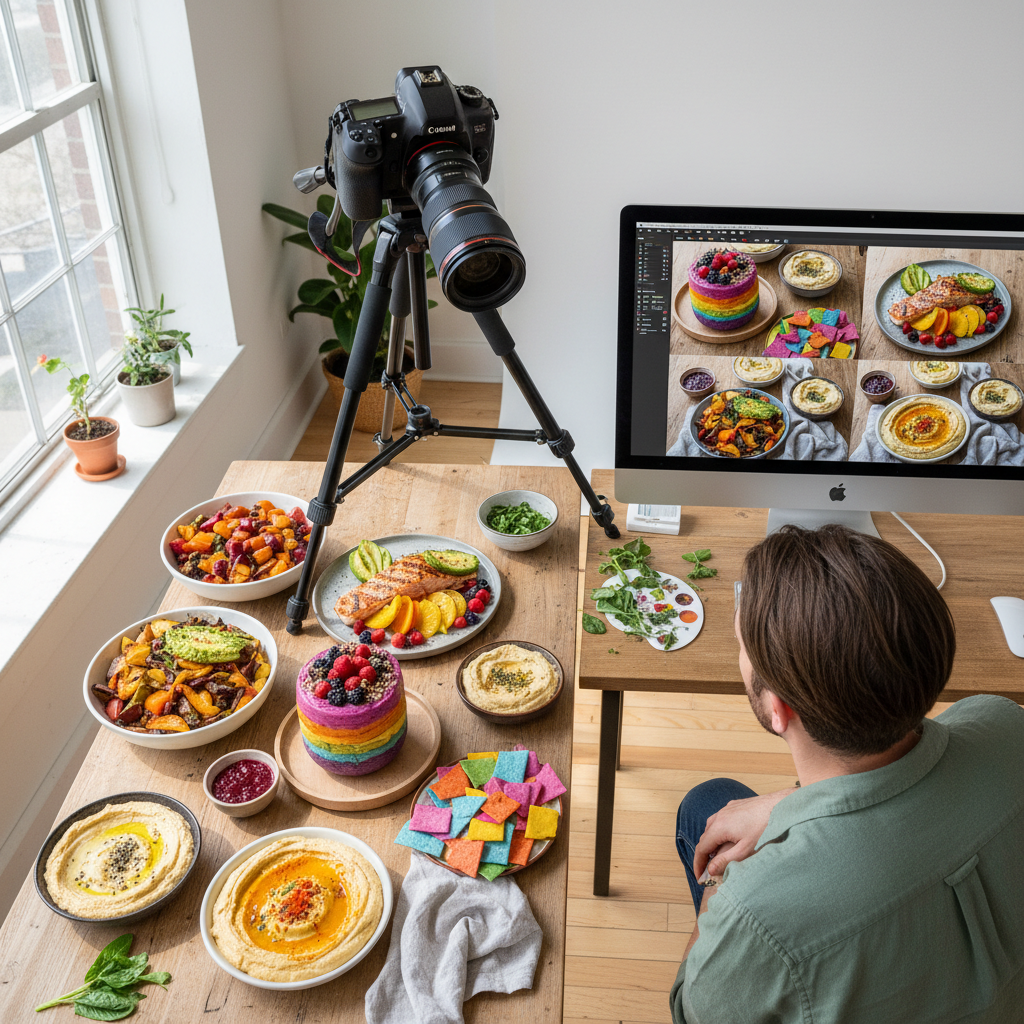
The Imperative of Color in Food Photography
In food photography, color is not merely an aesthetic element; it is a critical component that communicates freshness, flavor, and texture. Accurate and appealing color rendition can make a dish irresistible, while inconsistent or inaccurate color can detract from its perceived quality. Professional food photographers face the challenge of capturing and maintaining precise color across diverse dishes, ingredients, and lighting conditions, often under tight production schedules. This guide outlines strategies for mastering color editing, from foundational on-set practices to advanced post-production techniques, ensuring visual consistency and appetite appeal.
Foundational Color Management: On-Set Practices
Effective color management begins long before post-production. Establishing a robust on-set workflow minimizes color discrepancies and provides a consistent starting point for editing.
Camera and Monitor Calibration
Accurate color reproduction relies on a calibrated system. Cameras should be set to a neutral picture profile, and custom white balance should be established for each lighting setup using a gray card or color checker. Regularly calibrating your monitor with a hardware calibrator is essential to ensure that the colors displayed accurately represent the image data. Without a calibrated monitor, color judgments in post-production can be unreliable, leading to inconsistent results.
Consistent Lighting and White Balance
Controlling light is fundamental to controlling color. Employing consistent lighting setups, whether natural or artificial, helps minimize color shifts between shots. Diffusers, scrims, and reflectors are invaluable tools for shaping light and reducing harsh shadows that can alter perceived color. For white balance, using a dedicated gray card or color checker in the first shot of each new lighting scenario or ingredient batch provides a neutral reference point. This allows for precise white balance correction in post-production, ensuring true-to-life colors.
Tethered Shooting and Immediate Review
Shooting tethered to a calibrated monitor offers immediate, large-format feedback on color, exposure, and composition. This allows for real-time adjustments to lighting, styling, or camera settings, addressing potential color issues before they accumulate across an entire shoot. This proactive approach saves significant time in post-production and enhances overall image quality. For further insights into efficient workflows, consider exploring resources on Professional Photographers of America education.
Post-Production Color Correction Techniques
Even with meticulous on-set practices, post-production color correction is necessary to refine and standardize images. This involves both manual adjustments and, increasingly, AI-assisted workflows.
Manual Color Adjustments
Professional editing software like Adobe Lightroom provides a comprehensive suite of tools for manual color correction:
* White Balance: Begin by adjusting temperature and tint based on your gray card reference. This sets a neutral foundation.
* HSL (Hue, Saturation, Luminance): These sliders offer granular control over specific color ranges. For food, this is crucial for enhancing the vibrancy of greens (herbs), the richness of reds (sauces, meats), and the warmth of yellows/oranges (baked goods, fried items) without affecting other colors.
* Tone Curve: The tone curve can be used to adjust contrast and introduce subtle color shifts in highlights, midtones, and shadows, adding depth and mood.
* Color Grading: Tools for color grading allow for creative color shifts, often used to establish a consistent aesthetic across a series of images.
While powerful, manual editing can be time-consuming, especially for large galleries, and maintaining subjective consistency across hundreds of images can be challenging.
AI-Assisted Color Enhancement
Artificial intelligence (AI) tools are transforming post-production workflows by automating repetitive tasks and enhancing consistency. Platforms like Imagick.ai offer capabilities that can analyze color data across a batch of images, applying consistent adjustments based on learned patterns or user-defined styles. This can include intelligent white balance correction, hue/saturation adjustments, and even subtle color grading to match a desired aesthetic across an entire gallery. AI can significantly reduce the manual effort required for initial color passes, allowing photographers to focus on fine-tuning and creative decisions. Understanding how AI integrates into a broader workflow can be beneficial; more information on this can be found in guides on AI photo editing workflow and AI editing comparison.
Achieving Consistency Across a Gallery
One of the most significant challenges in food photography is maintaining color consistency across an entire menu or series of dishes, especially when ingredients and lighting vary.
* Developing a Master Preset: Create a base preset that reflects your desired style and apply it as a starting point to all images. This establishes a foundational look.
* Batch Processing: Utilize software features to apply global adjustments or AI-driven enhancements to multiple images simultaneously. This ensures a uniform starting point for individual refinements.
* Targeted Adjustments: After global application, address specific color nuances in individual dishes. For instance, a vibrant green herb garnish might need a slight HSL adjustment that doesn't apply to a golden-brown roast.
* Reference Images: Keep approved reference images (e.g., from a client's style guide or previous successful shoots) open on a second calibrated monitor to visually compare and match colors. This helps maintain objective consistency.
Integrating efficient batch processing and intelligent automation can significantly streamline the delivery process, as discussed in strategies to Avoid Missed Wedding Photo Deadlines: Proven Strategies.
Quality Control and Delivery
Before final delivery, a rigorous quality control process is essential to ensure color accuracy and client satisfaction.
* Final Review on Calibrated Monitor: Review all images on a calibrated monitor, checking for color shifts, banding, or artifacts that might have been introduced during editing.
* Client Feedback Loop: Establish a clear process for client review and feedback, especially regarding color preferences. Provide proofs that accurately represent the final output.
* Output Profiles: Ensure images are exported with the correct color profile (e.g., sRGB for web, Adobe RGB or ProPhoto RGB for print) as specified by the client or intended use. This prevents unexpected color shifts when images are viewed on different devices or printed.
Evaluating AI tools for quality control should also consider frameworks like the NIST AI Risk Management Framework to ensure responsible and effective integration into your workflow.
Practical Checklist for Food Photography Color Editing
* Pre-Production:
* Calibrate camera and monitor.
* Set custom white balance with a gray card/color checker.
* Ensure consistent lighting setup.
* Shoot tethered for immediate feedback.
* Post-Production:
* Apply initial white balance correction.
* Make global exposure and contrast adjustments.
* Refine colors using HSL and tone curve tools.
* Consider AI-assisted tools for batch consistency.
* Apply a consistent master preset or style.
* Quality Control & Delivery:
* Review all images on a calibrated monitor.
* Obtain client approval on color and style.
* Export with appropriate color profiles for intended use.
Mastering color editing in food photography requires a blend of technical precision, artistic vision, and efficient workflow strategies. By implementing these practices, photographers can consistently deliver images that are not only visually stunning but also accurately represent the deliciousness of the food.
Continue building a reliable editing workflow
Review the Imagick AI workflow, compare options in the AI editing comparison, and check current pricing. For broader professional education, visit Professional Photographers of America.